TikTok multi-account on iPhone
Multiple TikTok Accounts on One iPhone: Up to 50 Copies, Each With Its Own Region, IP and Fingerprint
Running a TikTok account matrix, a cross-border shop or a roster of client accounts means handling far more profiles than the TikTok app was built for. The official app lets you add several accounts, but only one is active at a time, so every reply, upload or check starts with a switch, and every account runs in the same app on the same device. To run multiple TikTok accounts on iPhone at once, iClone installs up to 50 separately signed copies of TikTok on one phone. Each copy signs in to its own account and stays signed in, and each has its own TikTok Tools panel for choosing a market region, routing traffic through its own proxy and giving it its own device fingerprint. Everything installs from Safari on the iPhone itself: no jailbreak, no computer and no foreign App Store account.
TikTok multi-account on one iPhone: up to 50 copies, all signed in at once
TikTok's own account switcher lets you add more than one account to the app, but only one is active at a time. That's fine for a personal profile and a side account. It breaks down when you run ten or thirty accounts across countries and niches: you switch before every comment, upload or inbox check, it's easy to post from the wrong account, and all of them live in the same app on the same device.
iClone signs each TikTok copy separately, so every copy is its own app with its own app identity and its own local data. Login, drafts, cache and settings are stored per copy, much as if you had dozens of different apps on your phone. Put one account in each copy and they all stay signed in; tap a copy and you're straight in that account. How separately signed copies compare with other ways of running the same app twice is covered in our guide to clone apps on iPhone.
- Up to 50 TikTok copies on one iPhone with the Multi-clone plan, each signed in to its own account at the same time.
- Data stays separate per copy, so accounts don't mix: you never open account A and find account B's feed or drafts. Deleting one copy doesn't affect the others.
- The official TikTok from the App Store can stay installed and keeps working next to the copies.
- One-tap download of videos without the watermark, handy for archiving footage and re-editing your own clips.
Switch each copy's market region in one tap
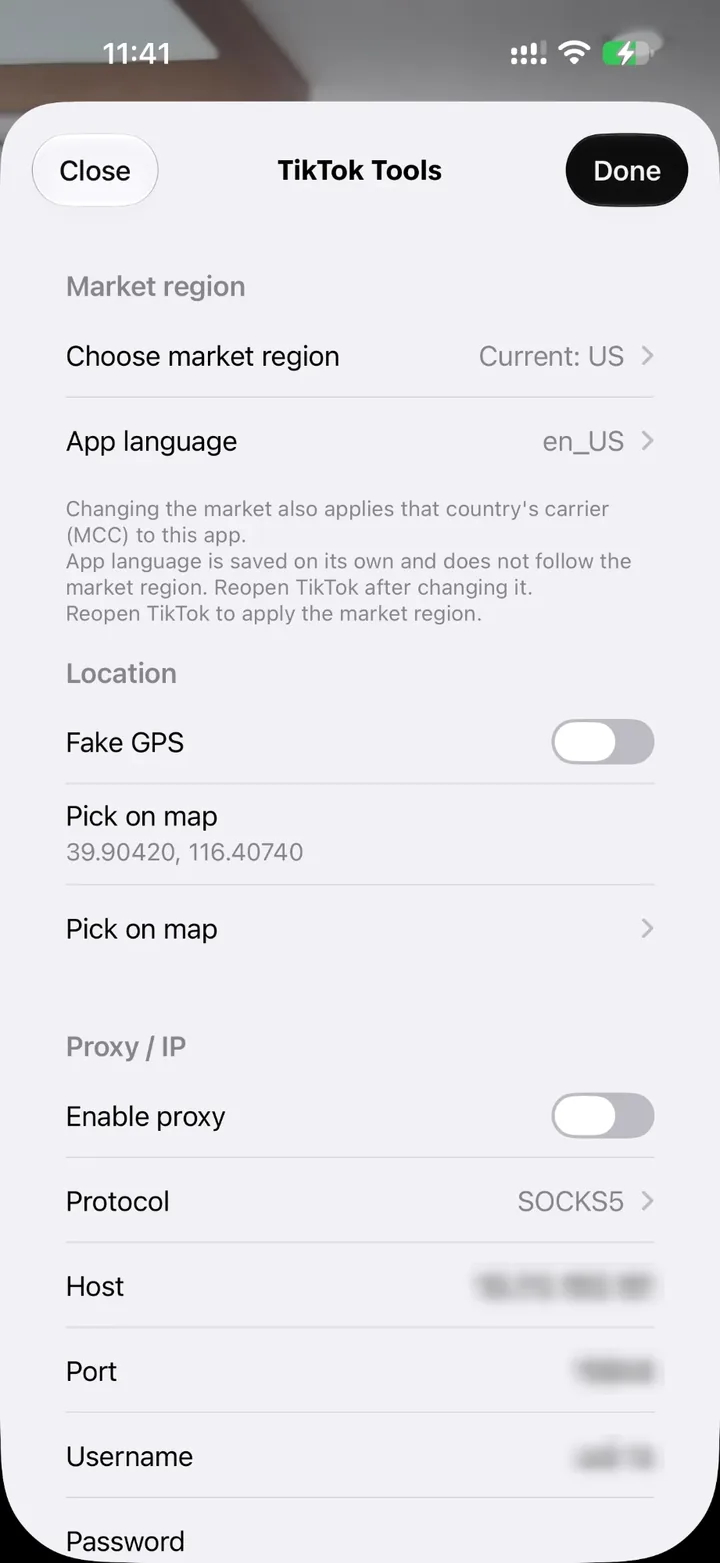
Which videos TikTok shows you, and where an account picks up views, depends heavily on the region TikTok thinks you're in. Open TikTok Tools inside a copy, tap “Choose market region”, search for a country and select it, then reopen TikTok. The App Store region, system region and carrier country that TikTok sees all switch together, and the copy also takes on that country's mobile country code (MCC). There's no new Apple ID to create and no SIM card to swap.
Every copy remembers its own market region: copy 1 on the US, copy 2 on the UK, copy 3 on Japan, side by side without getting in each other's way. “App language” is saved separately and doesn't follow the market region, so a copy set to the US market can still show its menus in Spanish or Chinese.
Users in mainland China and Hong Kong usually take the local SIM card out before opening TikTok. With a market region chosen, a copy reports the carrier of the country you picked instead, so the SIM can stay in for calls and verification texts. A VPN is still needed to reach TikTok from there; outside mainland China and Hong Kong, the copies don't need one.
Give every TikTok account its own proxy IP and device fingerprint
When a platform decides whether several accounts belong to the same person, two of the things it looks at are the network IP address and the device details. Thirty accounts that all sign in from one IP, on one model with one set of device identifiers, are easy to link together. Each iClone copy can carry its own network and device setup, which lowers the risk of your accounts being linked:
- Its own proxy: turn on “Enable proxy” and enter the host, port, username and password for that account, using SOCKS5, HTTP or HTTPS. “Test proxy” shows the exit IP, its country and the latency. Video traffic goes through the proxy too.
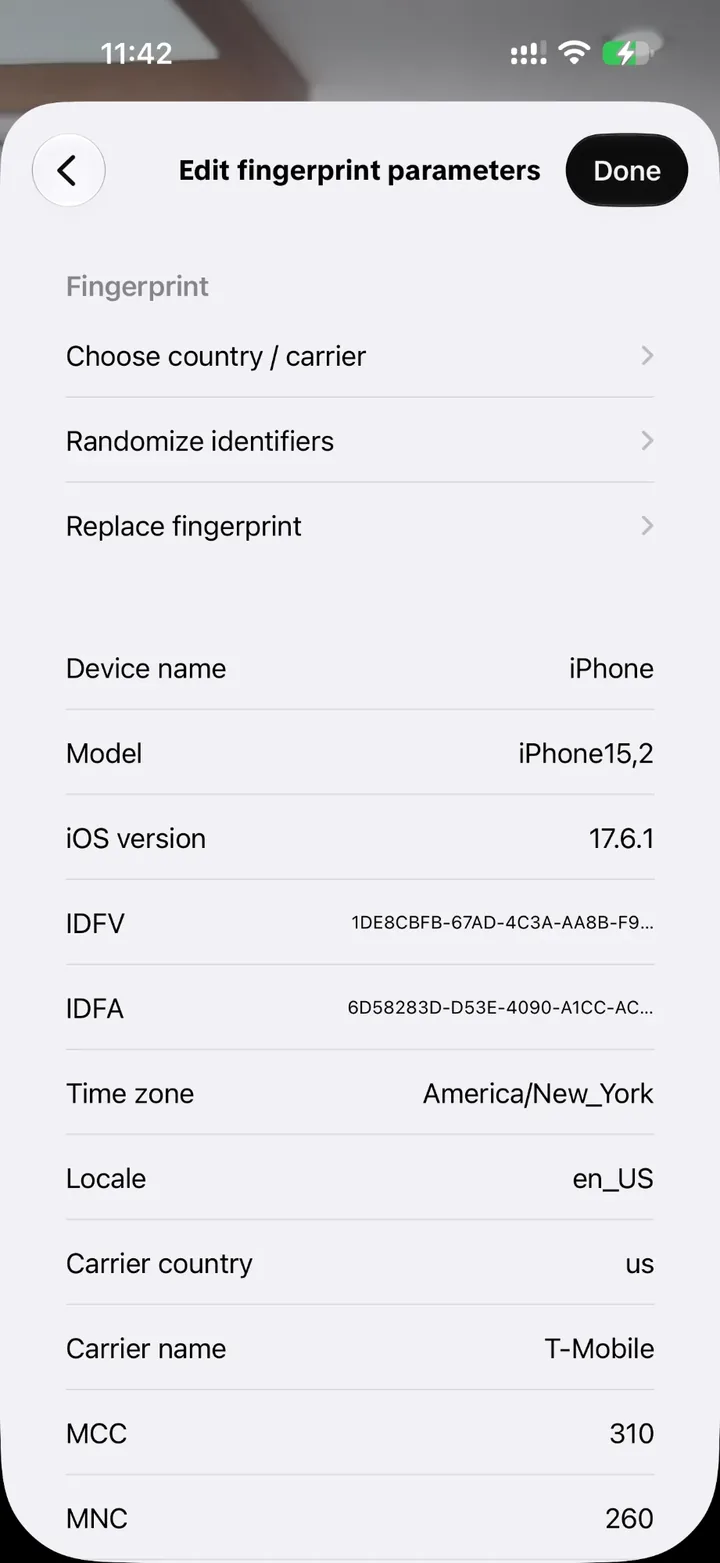
- Its own device fingerprint: with “Spoof device fingerprint” on, open “Edit fingerprint parameters” to set the device name, model, iOS version, IDFV, IDFA, time zone, locale, carrier country, carrier name, MCC, MNC, Wi-Fi name and Wi-Fi BSSID. “Randomize identifiers” and “Replace fingerprint” generate a fresh set in one tap, and “Choose country / carrier” sets the country and carrier the copy reports.
- Matching countries: “Match fingerprint to exit IP country” makes the fingerprint's country follow the proxy, so you don't end up with a US IP address and a Beijing time zone.
- A hidden SIM: “Wi-Fi only (hide SIM from this app)” keeps the phone's SIM card out of view for that copy.
- Its own location: turn on “Fake GPS” and use “Pick on map” to give each copy its own GPS position.
- Proxies come from you; iClone doesn't sell them. One account, one copy and one proxy keeps everything easy to track.
Who runs multiple TikTok accounts on one iPhone
Copies make the most difference when accounts come in dozens rather than twos and threes, and each one needs its own country, network and device:
- TikTok matrix operators: accounts split by country and niche, each in its own copy, with dozens managed from a single iPhone.
- Cross-border e-commerce and TikTok Shop sellers: the shop account, creator accounts and content accounts in separate copies, each with its own IP and fingerprint.
- Agencies and creator networks: one phone holding several clients' accounts, which makes handovers and daily checks simpler.
- Creators: test accounts next to the main one, so you can try an idea on a smaller account before posting it on the main account.
- Anyone in mainland China or Hong Kong who wants TikTok on a work phone without taking the SIM card out.
- Teams whose clients or brands are on Instagram as well: the same approach is covered in multiple Instagram accounts on iPhone.
How to clone TikTok on iPhone and set up each copy
Everything happens in Safari on the iPhone that will run the copies. There's no jailbreak and no computer, and iClone never asks for your Apple ID or your TikTok passwords; you sign in inside each copy yourself.
On the iPhone that will run TikTok, open iClone's TikTok page in Safari, choose the plan and confirm the device when prompted.
Pay, then follow the signing progress on your order page. When it's done, install the TikTok copies using the instructions shown there.
Open a copy, open TikTok Tools and use “Choose market region” to pick a country, for example the United States. Set “App language” too if you want a different one.
Turn on “Enable proxy”, enter the host, port, username and password of the proxy for this account, and tap “Test proxy” to check that it connects.
In the fingerprint settings, tap “Replace fingerprint”, or turn on “Match fingerprint to exit IP country”.
Tap “Done”, reopen TikTok and sign in to the account that belongs to this copy. Repeat for the other copies, keeping one account per copy.
Before you start
- In mainland China and Hong Kong a VPN is still needed to reach TikTok. The proxy inside a copy sets the IP address that account shows.
- Proxies are yours to provide. If the proxy test fails, videos keep buffering; turn the proxy off and they play normally again.
- After changing the market region or the fingerprint, reopen TikTok for the change to apply. Every copy keeps its own settings.
- A separate IP and fingerprint per copy lower the risk of accounts being linked, but they don't guarantee anything. TikTok decides on account restrictions under its own rules, iClone can't promise that any account stays unrestricted, and every account needs to follow TikTok's Community Guidelines.
- The TikTok plan runs for 12 months and doesn't renew automatically. It includes compatible updates, reinstalls after you delete the app or reset the phone, and support.
Frequently asked questions
How many TikTok accounts can I run on one iPhone at the same time?
With iClone's Multi-clone plan, up to 50. Each TikTok copy signs in to its own account, and all of them stay signed in at once. Every copy has its own app identity and local data, so the accounts don't mix.
Can't I just add accounts in the TikTok app?
You can add several accounts to the official app, but only one is active at a time and you switch to reach the others. That works for two or three profiles. For a TikTok multi-account setup where every account stays signed in with its own region, IP and fingerprint, you need separate copies.
How do I clone TikTok on iPhone? Do I need a jailbreak or a computer?
Neither. You choose a plan, confirm the device and install the copies in Safari on the iPhone itself. You don't need a foreign App Store account, and iClone never asks for your Apple ID or your TikTok password.
Can each TikTok copy use a different IP address?
Yes. Each copy's TikTok Tools panel has its own proxy settings, with SOCKS5, HTTP or HTTPS and a username and password. “Test proxy” shows the exit IP, its country and the latency. You supply the proxies; iClone doesn't sell them.
How do I change my TikTok region on iPhone without a new Apple ID or SIM card?
In TikTok Tools, tap “Choose market region”, pick a country and reopen TikTok. The App Store region, system region and carrier country that TikTok sees switch together, and each copy can use a different country.
Does a separate IP and fingerprint keep my TikTok accounts safe?
It lowers the risk of your accounts being linked, because they no longer share one network and one set of device details. It can't guarantee anything: TikTok decides on account restrictions under its own rules, so follow TikTok's Community Guidelines and terms of service.
Do I need to delete the TikTok app I already have?
No. The copies install as separate apps, so the App Store TikTok stays on your iPhone and keeps working. Deleting one copy doesn't affect the others either.
I'm in mainland China or Hong Kong. Do I have to take my SIM card out?
Not with a TikTok copy. Once you choose a market region in TikTok Tools, the copy reports that country's carrier, so your SIM can stay in for calls and texts. You still need a VPN to reach TikTok from there.
How long does the TikTok plan last?
12 months, with no automatic renewal. During that time you get compatible updates, reinstalls after deleting the app or resetting the phone, and support. Questions before or after you buy go to iClone support.